
Tag Archives: glsl
GLSL Hacker, OSX / Cocoa
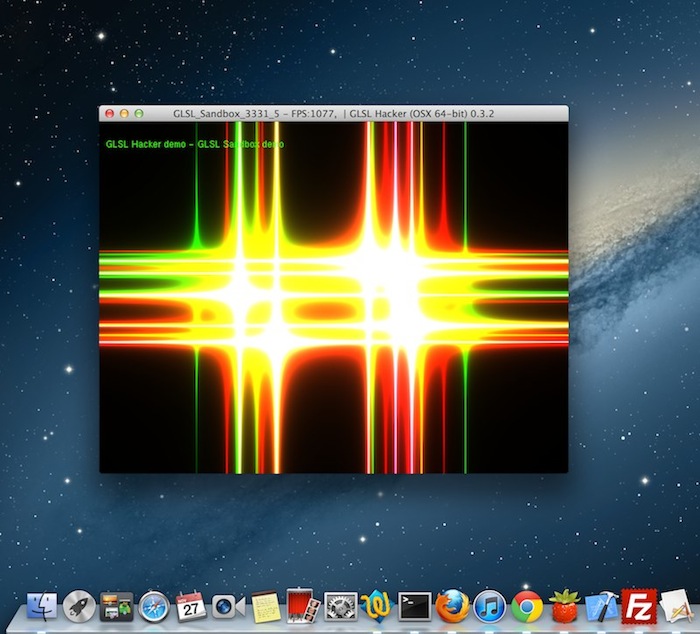
Live Coding
Les Cartes GeForce et le keyword GLSL Precise
GLSL Random Generator
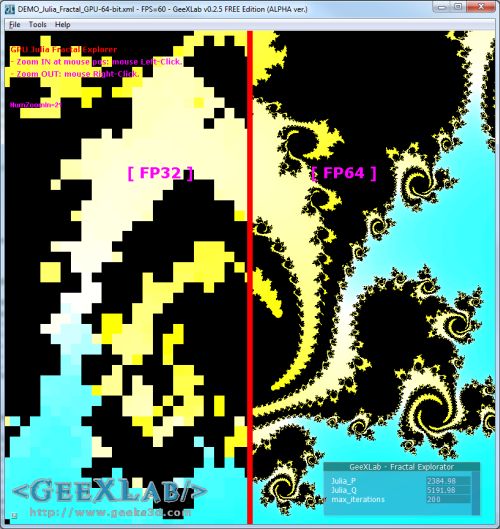
Test de la Double Precision FP64 en GLSL
(GLSL) Ecriture dans gl_FragDepth
How To Linearize the Depth Value
Here is a GLSL code snippet to convert the exponential depth to a linear value:
float f=1000.0;

float n = 0.1;

float z = (2 * n) / (f + n - texture2D( texture0, texCoord ).x * (f - n));
where:
– f = camera far plane
– n = camera near plane
– texture0 = depth map.
The Art of Texturing in GLSL is Now a Resource of OpenGL.org
The tutorial The Art of Texturing Using the OpenGL Shading Language has been included in OpenGL.org website in OpenGL API OpenGL Shading Language Sample Code & Tutorials section. Rather cool… 😉

Vertex Displacement Mapping in GLSL Now Available on Radeon!
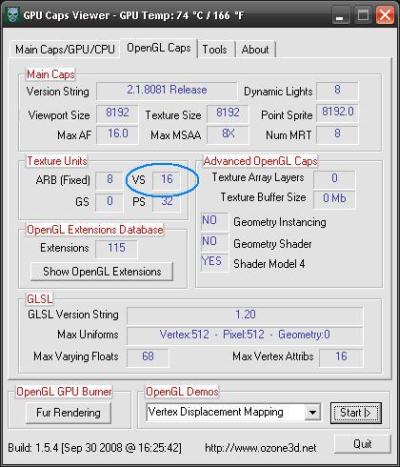
As I said in this news, the release of Catalyst 8.10 BETA comes with a nice bugfix: vertex texture fetching is now operational on Radeon (at least on my Radeon HD 4850). From 2 or 3 months, Catalyst makes it possible to fetch texture from inside a vertex shader. You can see with GPU Caps Viewer how many texture units are exposed in a vertex shader for your Radeon:
But so far, vertex texture fetching in GLSL didn’t work due to a bug in the driver. But now this is an old story, since VTF works well. For more details about vertex displacement mapping, you can read this rather old (2 years!) tutorial: Vertex Displacement Mapping using GLSL.
This very cool news makes me want to create a new benchmark based on VTF!
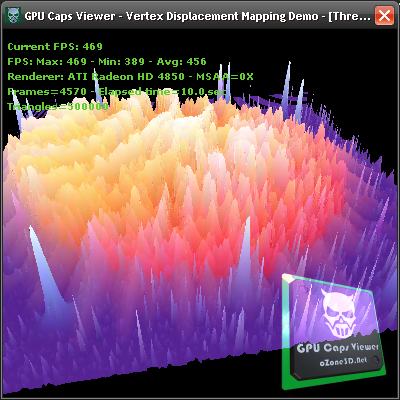
I’ve only tested the XP version of Catalyst 8.10. If someone has tested the Vista version, feel free to post a comment…
Next step for ATI driver team: enable geometry texture fetching: allows texture fetching inside a geometry shader…
See you soon!
Saturate function in GLSL
During the conversion of shaders written in Cg/HLSL, we often find the saturate() function. This function is not valid in GLSL even though on NVIDIA, the GLSL compiler accepts it (do not forget that NVIDIA’s GLSL compiler is based on Cg compiler). But ATI’s GLSL compiler will reject saturate() with a nice error. This function allows to limit the value of a variable to the range [0.0 – 1.0]. In GLSL, there is a simple manner to do the same thing: clamp().
Cg code:
float3 result = saturate(texCol0.rgb - Density*(texCol1.rgb));
GLSL equivalent:
vec3 result = clamp(texCol0.rgb - Density*(texCol1.rgb), 0.0, 1.0);
BTW, don’t forget all float4, float3 and float2 which correct syntax in GLSL is vec4, vec3 and vec2.
Lors de la conversion de shaders écrits en Cg/HLSL, on trouve souvent la fonction saturate(). Cette fonction n’est pas valide en GLSL bien que sur les NVIDIA le compilateur l’accepte (n’oublions pas que le compilateur GLSL de NVIDIA repose sur le compilateur Cg). Mais le compilateur GLSL d’ATI générera une belle erreur à la vue de saturate(). Cette fonction sert à limité la valeur d’une variable entre 0.0 et 1.0. En GLSL il y un moyen tout simple de faire la même chose: clamp().
Code Cg:
float3 result = saturate(texCol0.rgb - Density*(texCol1.rgb));
Equivalent GLSL:
vec3 result = clamp(texCol0.rgb - Density*(texCol1.rgb), 0.0, 1.0);
Au passage lors des conversions, n’oubliez pas les float4, float3 et float2 qui s’écrivent en GLSL en vec4, vec3 et vec2.
Velvet Shader Preview
[French]
Un petit shader GLSL de velour (velvet en anglais) ça vous dit? Et bien en voilà un, tout du moins un aperçu de celui que je viens de coder pour les besoins d’une démo avec le logiciel Smode. Smode… Un pur soft pour produire de la démo. Et le truc cool c’est les démos que je fais avec Smode seront aussi disponible pour Demoniak3D. Ne cherchez pas Smode, il n’est pas disponible au public. Seules quelques rares personnes, très sévèrement sélectionnées ont la chance de s’amuser avec. Mais vous pouvez toujours m’envoyer un mail, on ne sait jamais…
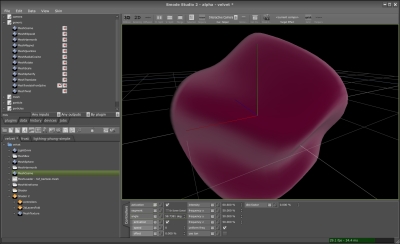
Dès que la prochaine release de Demoniak3D, la 1.24.0 (le numéro de version sera peut être le 1.30.0 vu le nombre de modifs), je releaserai la démo du velour avec son beau shader GLSL. Et si je tarde un peu, n’hésitez pas à me poster un petit message pour me rappeler à l’ordre.
[/French]
[English]
Are you ready for a small velvet GLSL shader? Here’s one, at least a preview of the one I’ve just coded for a demo with Smode. Smode… a software dedicated to create… demos! And the cool thing, is that Smode demos will be also available for Demoniak3D. Don’t look for Smode, it’s not available for you, public… Only few people on this planet are enough lucky to play with. But if you really want to touch it, just drop me an email…
As soon as the next release of Demoniak3D, the 1.24.0 (or better the 1.30.0 because of the huge amount of changes), will be ok, I’ll put online the velvet demo with its nice GLSL shader. And if I’m late, don’t hesitate to post a small message to wake me up!
[/English]
GLSL support in Intel graphics drivers
A user from oZone3D.Net forum asked me some info about the GLSL support of Intel graphics chips. It’s wellknown (sorry Intel) that Intel has a bad OpenGL support in its Windows drivers and even if Intel’s graphics drivers support OpenGL 1.5, there is still a lack of GLSL support. We can’t find the GL_ARB_shading_language_100 extension (this extension means the graphics driver supports the OpenGL shading language) and this extension should be supported by any OpenGL 1.5 compliant graphics driver. You can use GPU Caps Viewer to check for the avaibility of GL_ARB_shading_language_100 (in OpenGL Caps tab).
Here is an example of a Intel’s graphics driver that support openGL 1.5 without supporting GLSL:
– Mobile IntelR 965 Express Chipset Family
For more examples, look at users’s submissions here: www.ozone3d.net/gpu/db/
Okay this is my analysis, but what is the Intel point of view? Here is the answer:
– x3100 & OpenGL Shader (GLSL) thread
– Intel’s answer
I think GLSL support with Windows is not a priority for Intel…
GLSL float to RGBA8 encoder
Packing a [0-1] float value into a 4D vector where each component will be a 8-bits integer:
vec4 packFloatToVec4i(const float value)
{
  const vec4 bitSh = vec4(256.0*256.0*256.0, 256.0*256.0, 256.0, 1.0);
  const vec4 bitMsk = vec4(0.0, 1.0/256.0, 1.0/256.0, 1.0/256.0);
  vec4 res = fract(value * bitSh);
  res -= res.xxyz * bitMsk;
  return res;
}
Unpacking a [0-1] float value from a 4D vector where each component was a 8-bits integer:
float unpackFloatFromVec4i(const vec4 value)
{
  const vec4 bitSh = vec4(1.0/(256.0*256.0*256.0), 1.0/(256.0*256.0), 1.0/256.0, 1.0);
  return(dot(value, bitSh));
}
Source of these codes: Gamedev forums
Quick Review – Lumina – GLSL studio
Je viens de m’amuser un peu avec Lumina. C’est un petit environnement de mise au point de shader GLSL. Le projet demarre et il y a encore pas mal de petites coquilles (essayez de charger plusieurs projets les uns à la suite des autres ou plus simplement chargez le projet de test deferred3.lum: l’interface graphique aime moyennement!) qui trainent mais le concept est bon. En regardant de plus prêt, cela ressemble fortement à une interface graphique posé sur un soft comme Demoniak3D. Il y a des scripts (écrits dans un language basé sur ECMA)pour mettre en place les éléments de la scene 3d et les controler. Il y a aussi les scripts GLSL (vertex, pixel et geometry). Si on analyse un fichier de projet on découvre une structure similaire à une démo Demoniak3D: un script XML, des nodes <script>, <shader>, etc.
Maintenant que le tour du proprio est fait, voilà mon premier projet de test ultra simple: afficher un torus jaune qui tourne le tout utilisant un vertex et un pixel shader pour le rendu. J’ai pu coder ce projet rapidement avec une analyse rapide des fichiers de projets *.lum.
Le projet est téléchargeable ici: lumina_jegx_test_01.zip
Globalement c’est sympa mais l’interêt de l’interface graphique est discutable. Dans ce type de soft (Lumina ou Demoniak3D) soit l’interface graphique est de haut niveau et simple à utiliser soit vaut mieux s’en passer. Je vais quand même étudier plus en détail le fonctionnement de Lumina ne serait-ce que pour améliorer Demoniak3D et son successeur…
Dans le même esprit que lumina il y a aussi FX Composer (NVIDIA) et RenderMonkey (ATI).
GLSL: ATI vs NVIDIA – Part…
While I was releasing the Julia’s Fractal demo, I tested it on NVIDIA and ATI (as usual before releasing a demo). And as usual, a new difference appeared in the way the GLSL is supported on ATI and on NVIDIA. On NVIDIA the following is line is ok but produces an error on ATI (Catalyst 8.1):
gl_FragColor = texture1D(tex, (float)(i == max_i ? 0 : i) / 100);
To be ATI Radeon-compliant, this instruction must be split in two:
if( i == max_i )
{
	gl_FragColor = texture1D(tex, 0.0);
}
else
{
	gl_FragColor = texture1D(tex, i/100.0);
}
I can’t immagine a world with more than two major graphics cards manufacturers. But if such a world exists, I stop 3d programming… Fortunately, NVIDIA accepts ATI GLSL syntax so there is only one code at the end. Conlusion: always check your GLSL shaders on ATI and NVIDIA before releasing a demo…
Catalyst 8.1 GLSL lighting bug fixed
The previous catalyst (7.11 / 7.12) had a nasty bug in dynamic lights management in GLSL.
I’ve just tested the latest Catalyst 8.1 WHQL with the Demoniak3D demo I coded for, and the bug has been fixed. In the release notes, there is no trace of this bug and its correction. Anyway, now this bug is fixed and this is the important thing.
A cumbersome bug in the Catalyst 7.12

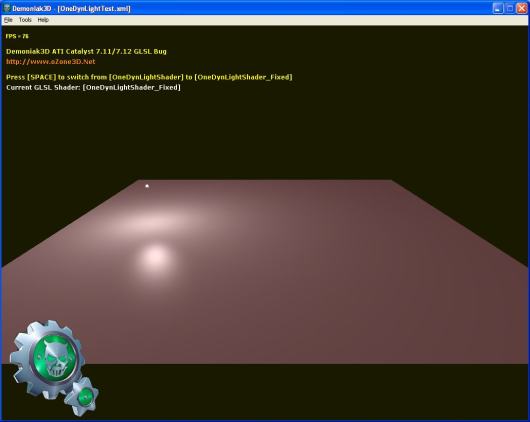
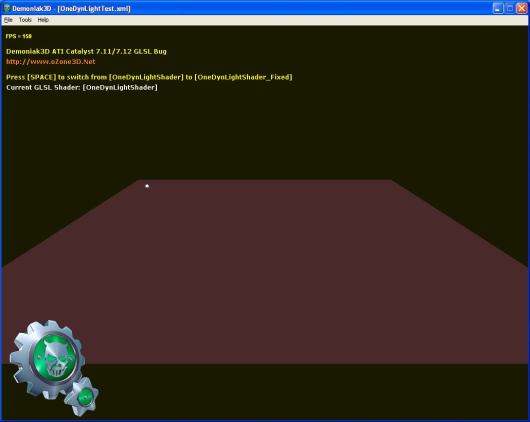
The latest Catalyst version is the 7.12 (the Cat7.12 internal number is 8.442.0.0). But exactly like the Cat7.11, these drivers have a bug in the management of dynamic lights in GLSL. But this time, I searhed for the source of bug because this bug is a little bit cumbersome in Demoniak3D demos. And we can’t use a previous version since Cat7.11+ are required to drive the radeon 3k (HD 3870/3850). Then I’ve coded a small Demoniak3D script that shows the bug. This script displays a mesh plane lit by a single dynamic light. The key SPACE allows to switch the GLSL shader: from the bug-ridden to the fixed and inversely.
– The following image shows the plane enlightened with the fixed shader:
– The following image shows the plane lit with the bug-ridden shader:
Okay that’s cool, but where does the bug come from ? After a little time spent on shaders tweaking, my conclusion is that the bug is localized in the value of the built-in uniform variable gl_LightSource[0].position. In the vertex shader, this variable should contain the light position in camera space. It’s OpenGL that does this transformation, and we, poor developers, just need to specify somwhere in the C++ app the light position in world coordinates. In the vertex shader, gl_LightSource[0].position helps us to get the light direction used later in the pixel shader:
lightDir = gl_LightSource[0].position.xyz - vVertex;
With the Catalyst 7.11 and 7.12, the value stored in gl_LightSource[0].position is wrong. Then, one workaround, until the ATI driver team fix the bug, is to manually compute the light pos in camera space by passing to the vertex shader the camera view matrix and the light pos in world coord:
	vec3 lightPosEye = vec3(mv * vec4(-150.0, 50.0, 0.0, 1.0));
	lightDir = lightPosEye - vVertex;
mv is the 4×4 view matrix and vec4(-150.0, 50.0, 0.0, 1.0) is the hard coded light pos in world coord.
In the fixed pipeline, dynamic lights are well handled as shown in the next image:
In the Demoniak3D demo, the bug-ridden GLSL shader is called OneDynLightShader and the fixed one OneDynLightShader_Fixed. The demo source code is localized in the OneDynLightTest.xml file. To start the demo, unzip the archive in a directory and launch
DEMO_Catalyst_Bug.exe.
The demo is downloadable here: Demoniak3D Catalyst 7.11/7.12 Bug
This bug seems to affect all radeons BUT under Windows XP only. Seems as if ATI is forcing people to switch to Vista. Not cool… Or maybe ATI begins to implement OpenGL 3.0 in the Win XP drivers. Do not forget that with OpenGL 3.0 as with DX10, the fixed functions of the 3D pipeline like the management of dynamic lights will be removed.
Les Catalyst 7.12 toujours à la sauce “Bug-Inside”
Les derniers pilotes Catalyst ont la version 7.12 (le numéro interne des Cat7.12 est le 8.442.0.0 – c’est pas un téléphone ok!). Mais exactement comme les 7.11, ces drivers ont un bug dans la gestion des lumières dynamiques en GLSL. Mais cette fois-ci, je me suis mis à la recherche du bug car il est un peu, voire très génant pour les demos Demoniak3D. J’ai donc pondu un petit script Demoniak3D qui met en évidence ce bug. Ce script montre un mesh plan éclairé par une lumière dynamique. Un appui sur la touche SPACE permet de changer de shader GLSL: on passe du shader bogué au shader corrigé et inversement.
– L’image suivante montre le plan éclairé avec le shader corrigé:
– L’image suivante montre le plan éclairé avec le shader bogué:
okay tout ceci est bien, mais d’oû vient le bug? Après avoir passé un peu de temps à tweaker les shaders, j’en suis arrivé à la conclusion que le bug se situe au niveau de la valeur contenue dans la variable uniforme built-in gl_LightSource[0].position. Au niveau du vertex shader, cette variable contient la position de la lumière exprimée l’espace de la caméra. C’est OpenGL qui effectue cette transformation, à notre niveau il suffit de spécifier la position de la lumière en coordonnées du monde. Au niveau du vertex shader, gl_LightSource[0].position nous permet de calculer la direction de la lumière utilisée plus tard dans le pixel shader:
lightDir = gl_LightSource[0].position.xyz - vVertex;
Avec la Radeon HD 3870 et les Catalyst 7.11 et 7.12, la valeur contenue dans gl_LightSource[0].position est fausse.
Donc le workaround que je propose en attendant que la driver team d’ATI corrige le bug, est de passer au vertex shader la position de la lumière exprimée dans les coordonnées du monde ainsi que la matrice de vue de la camera et de faire la transformation à la main:
	vec3 lightPosEye = vec3(mv * vec4(-150.0, 50.0, 0.0, 1.0));
	lightDir = lightPosEye - vVertex;
mv représente la matrice 4×4 de vue de la caméra et vec4(-150.0, 50.0, 0.0, 1.0) représente la position de la lumière en coordonnées du monde.
Au niveau pipeline fixe, les lumières dynamiques sont bien gérées comme le montre l’image suivante:
Au niveau de la démo Demoniak3D, le shader GLSL bogué est appelé OneDynLightShader et celui corrigé OneDynLightShader_Fixed. Le code source de la démo Demoniak3D se trouve dans le fichier OneDynLightTest.xml. Pour lancer la demo, dézippez l’archive dans un répertoire
et lancez DEMO_Catalyst_Bug.exe.
La démo est téléchargeable ici: Demoniak3D Catalyst 7.11/7.12 Bug
Ce bug affecte toutes les radeons MAIS sous Windows XP uniquement. On dirait qu’ATI nous force un peu la main pour passer sous Vista. Pas trop sympa… Ou alors ATI commence à implémenter OpenGL 3.0 dans les drivers XP. Car n’oublions pas qu’avec OpenGL 3.0, tout comme avec DX10, les fonctions fixes du pipelines 3D comme la gestion des lumières dynamiques sont supprimées.
Je voudrais remercier la communauté WorldPCSpecs pour les tests. Merci les gars!
Les nouveaux Catalyst 7.11 à la sauce “Bug-Inside”
ATI vient de nous livrer les nouveaux Catalyst 7.11 pour nos belles Radeon. Mais on dirait que ça commence à être une habitude chez les petits gars d’ATI de nous pondre des pilotes bogués surtout pour les nouvelles cartes! Souvenez-vous des Catalyst 7.9 qui enfin corrigeaient un gros bug au niveau des shadow-maps et ce bug n’était visible que pour les Radeon 2k. Bien maintenant c’est la même chose avec les Cat7.11: ils sont bogués pour les Radeon 3k au niveau OpenGL: impossible de mettre plus d’une lumière dynamique dans les shaders GLSL! C’est quand même un sacré bug! Bon pour le moment je n’ai testé que sous WinXP donc peut etre que sous Vista c’est mieux.
A part ce bug (il y en a surement d’autres mais j’ai pas fait assez de tests pour le savoir), les Cat7.11 sont les premiers pilotes qui supportent les Radeon HD 3870. Le numéro interne des Cat7.11 est les 8.432.0.0.
Le téléchargement des Cat7.11 se passe ici:
WinXP 32-bit: [DOWNLOAD]
Vista 32-bit: [DOWNLOAD]