| Current version: 0.45.1 |
Current version: 1.30.0
|
Current version: 1.55.0.0
|
Current version: 0.26.0.0 |
|
|
|
Current version: 1.5.4
|
Current version: 0.3.0 |
Current version: 0.3.0
|
Current Version: 1.23.0
|
| |
|  Image Filtering with GLSL - Convolution Kernels
By Jérôme Guinot - jegx [at] ozone3d [dot] net
Initial draft: December 8, 2005
Last update: January 8, 2006
Translated from french by Samir Fitouri
[ Index ]Introduction | Page 2 | Page 3 | Page 4 | Page 5 | Page 6 | Page 7 �Next Page 2 - Gaussian Filter
 This filter is used to add blur to an image. 1 2 1
2 4 2
1 2 1
The demo associated with this filter is DEMO_gaussian_filter.xml. Load the DEMO_gaussian_kernel.xml in Demoniak3D file and you will get the following result: 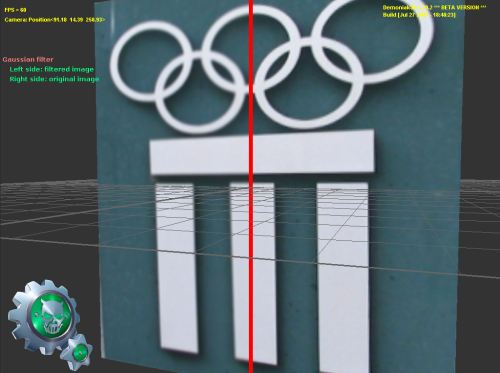
Fig.2 - Gaussian filter.The working of the shaders in this tutorial is the following: the base image is plated on a mesh plane. The left part of the
image (texture coordinate u < 0.495) is filtered while the right part (u > 0.505) is not. All the texels that are located in the
[0.495; 0.505] interval will be colored in red in order to form a vertical separating line.
The dimension of the base texture must be of a power of 2. In our case, they are 256x256. These measurements are passed as uniform
variables to the pixel shaders in order to calculate the distances to access the neighboring pixels to the pixel being processed.
The vertex and pixel shaders being the same for all the filters, only the convolution core will be given.
If the code of the previous pixel shader does not work properly, it is possible to take of the branches and to unroll the loop as
shown in the following code: All the previous codes run properly on a nVidia GPU based graphic controller. Graphics controllers featuring the ATI chipsets seem
not to support the constant array functionality. In case of an ATI chipset, the pixel shader code becomes: The code of the pixel shader above is fully operational on a Radeon 9800pro graphics controller featuring the Catalyst 5.11 drivers.
The accompanying projects are therefore provided in two versions: one exclusively intended for the nVidia chipsets while an other
is meant for both ATI and nVidia. Introduction | Page 2 | Page 3 | Page 4 | Page 5 | Page 6 | Page 7 �Next Page |
|
| |




