FurMark
Current Version: 1.8.2
»FurMark homepage
»FurMark 1.8.x Submissions
»Benchmark Submissions

GPU Caps Viewer
Current Version: 1.9.0
»GPU Caps Viewer homepage
»GPU DB Submissions

PhysX FluidMark
Current Version: 1.2.0
»FluidMark homepage
»FluidMark 1.2.x Submissions
»Benchmark Submissions

GeeXLab
Current Version: 0.2.0
»GeeXLab homepage
»GeeXLab Overview

GPU Shark
Current Version: 0.2.3
»GPU Shark homepage

TessMark
Current Version: 0.2.0
»TessMark homepage

Blogs
»JeGX's Infamous Lab

 
The Mandelbrot Set: Colors of Infinity

By Nathan Reed - www.reedbeta.com
and
Jérôme Guinot - www.oZone3D.Net

Initial draft: January 25, 2006


[ Index ]

Page 1 | Page 2 | Page 3 | Page 4 | Page 5 | Page 6

»Next Page


5 - Implementation with Demoniak3D


Two different Demoniak3D projects come with this tutorial.

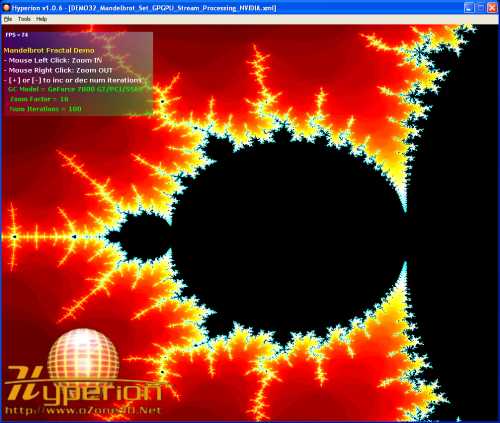
The first one is a direct implementation of the part "4.1 - A First Attempt". The first demo is located in the file DEMO1_Mandelbrot_Set_GPU.xml. Just load this file into Demoniak3D. DEMO1 does not use a 1D texture map but instead uses the number of iterations num_iterations as factor to compute outside color.

The second one is the direct implementation of the stream processing method. The second demo is shipped in two versions: one for nVidia and one for ATI (and other manufacturers...).

nVidia version: load the file
DEMO32_Mandelbrot_Set_GPGPU_Stream_Processing_NVIDIA.xml
in Demoniak3D if you have a nVidia graphics controller (gf5200 and +).

ATI version: load the file
DEMO31_Mandelbrot_Set_GPGPU_Stream_Processing_ATI.xml
if you have an ATI board (radeon9500 and +).

The demos are downloadable at the Mandelbrot project page: GPGPU Mandelbrot Demo. A more detailed explanation is provided about implementation and FBO (Framebuffer Object).


[ Index ]

Page 1 | Page 2 | Page 3 | Page 4 | Page 5 | Page 6

»Next Page


Language:

3D Graphics Search Engine:

The Geeks Of 3D


Geeks3D's Articles
»GPU Memory Speed Demystified

»Multi-Threading Programming Resources

»GeForce and Radeon OpenCL Overview

»How to Get your Multi-core CPU Busy at 100%

»How To Make a VGA Dummy Plug

»Night Vision Post Processing Filter


Geeks3D latest news

Demoniak3D
Current Version: 1.23.0
»Demoniak3D
»Download
»Libraries and Plugins
»Demos
»Online Help - Reference Guide
»Codes Samples


Misc
»Texture DataPack #1
»Asus Silent Knight CPU Cooler
Page generated in 0.045172929763794 seconds.