Spot light radiates its rays in a cone. Shaders codes are the same as for point light but in the pixel shader there is a little change.
We add a test in order to check whether or not the light ray direction is located in the cone. To perform this test, we're going
to use two GLSL variables: gl_LightSource[0].spotDirection and gl_LightSource[0].spotCosCutoff.
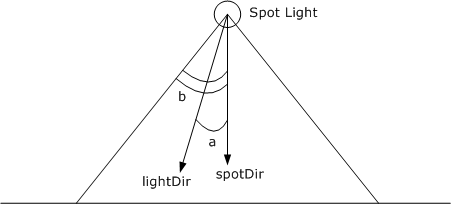
Fig.2 - Spot Light Configuration.In order to know if the ray of light is located in cone of the light, we're going to compare the angles a and b.
If a is smaller than b then the ray is located in the cone. b is the spot cutoff angle (20 degrees in the demo).
a is the angle between the direction of the spot and the current processing ray of light.
If lightDir and spotDir are normalized vectors, then to calculate a, we can do:
dot(lightDir, spotDir) = |lightDir| * |spotDir| * cos(a)
dot(lightDir, spotDir) = cos(a)
It would be nice to have the possibility to compare cos(a) directly without computing the inverse cosine.
That's the role of the variable gl_LightSource[0].spotCosCutoff. It corresponds to the b angle cosine.
Therefore, the test becomes:
if( dot(lightDir, spotDir) > gl_LightSource[0].spotCosCutoff )
{
	// Do point light calculations.
}
We don't have to forget that the smaller the angle is, the greater the cosine is. That explains the way the test is done.
Now, let's see the spot light pixel shader code:
[Pixel_Shader]

varying vec3 normal, lightDir, eyeVec;

void main (void)
{
	vec4 final_color =
	(gl_FrontLightModelProduct.sceneColor * gl_FrontMaterial.ambient) +
	(gl_LightSource[0].ambient * gl_FrontMaterial.ambient);

	vec3 L = normalize(lightDir);

	vec3 L = normalize(lightDir);
	vec3 D = normalize(gl_LightSource[0].spotDirection);

	if (dot(-L, D) > gl_LightSource[0].spotCosCutoff)
	{
		vec3 N = normalize(normal);

		float lambertTerm = max( dot(N,L), 0.0);
		if(lambertTerm > 0.0)
		{
			final_color += gl_LightSource[0].diffuse *
			gl_FrontMaterial.diffuse *
			lambertTerm;

			vec3 E = normalize(eyeVec);
			vec3 R = reflect(-L, N);

			float specular = pow( max(dot(R, E), 0.0),
			gl_FrontMaterial.shininess );

			final_color += gl_LightSource[0].specular *
			gl_FrontMaterial.specular *
			specular;
		}
	}

	gl_FragColor = final_color;
}
The light vector is reversed because defined as the difference between the position of the spot light and the position
of the current vertex in processing (see in the vertex shader code). So light and spot direction vectors are in opposition.
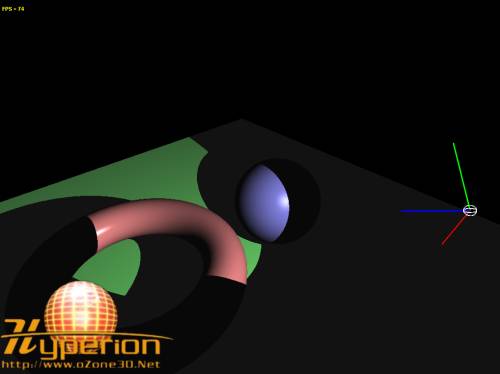
Fig.3 - spot_light.xml demo.We dare say that the franc limit between the lighted area and the unlighted one is not really realistic. We are going to
borrow Direct3D spot lights principle. D3D spots have two cones: the inner cone and the outer cone. The inner cone is equivalent to
the OpenGL's one. The purpose is to get a decreasing intensity between the inner and the outer cones in order to create a area of penumbra.
In that manner, the edge of the shadow will not be hard anymore but will be gradual and soft.
We're going to see a very simple method that consists in decreasing in a linear manner the light intensity using a variable called
falloff. This variable is the ratio between the current angle between both cones and the difference between both cones.
The shader code will help us to understand the technique:
[Pixel_Shader]

varying vec3 normal, lightDir, eyeVec;

const float cos_outer_cone_angle = 0.8; // 36 degrees

void main (void)
{
	vec4 final_color =
	(gl_FrontLightModelProduct.sceneColor * gl_FrontMaterial.ambient) +
	(gl_LightSource[0].ambient * gl_FrontMaterial.ambient);

	vec3 L = normalize(lightDir);
	vec3 D = normalize(gl_LightSource[0].spotDirection);

	float cos_cur_angle = dot(-L, D);

	float cos_inner_cone_angle = gl_LightSource[0].spotCosCutoff;

	float cos_inner_minus_outer_angle =
	cos_inner_cone_angle - cos_outer_cone_angle;

	if (cos_cur_angle > cos_inner_cone_angle)
	{
		vec3 N = normalize(normal);

		float lambertTerm = max( dot(N,L), 0.0);
		if(lambertTerm > 0.0)
		{
			final_color += gl_LightSource[0].diffuse *
			gl_FrontMaterial.diffuse *
			lambertTerm;

			vec3 E = normalize(eyeVec);
			vec3 R = reflect(-L, N);

			float specular = pow( max(dot(R, E), 0.0),
			gl_FrontMaterial.shininess );

			final_color += gl_LightSource[0].specular *
			gl_FrontMaterial.specular *
			specular;
		}
	}
	else if( cos_cur_angle > cos_outer_cone_angle )
	{
		float falloff = (cos_cur_angle - cos_outer_cone_angle) /
		cos_inner_minus_outer_angle;

		vec3 N = normalize(normal);

		float lambertTerm = max( dot(N,L), 0.0);
		if(lambertTerm > 0.0)
		{
			final_color += gl_LightSource[0].diffuse *
			gl_FrontMaterial.diffuse *
			lambertTerm * falloff;

			vec3 E = normalize(eyeVec);
			vec3 R = reflect(-L, N);

			float specular = pow( max(dot(R, E), 0.0),
			gl_FrontMaterial.shininess );

			final_color += gl_LightSource[0].specular *
			gl_FrontMaterial.specular *
			specular * falloff;
		}
	}

	gl_FragColor = final_color;
}
Here is the result:
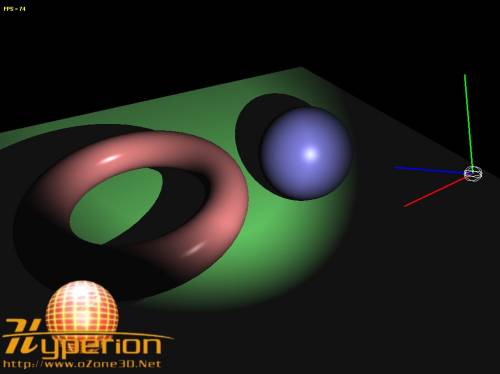
Fig.4 - The spot_light_enhanced_demo.xml demo.
Update: March 8, 2006:
Here is an optimized version of the previous pixel shader suggested by one of the forum members in this topic
This version removes one dynamic branching and seriously improves the code speed (there are about 100 FPS of difference between both pixel shaders!!!):
[Pixel_Shader]

varying vec3 normal, lightDir, eyeVec;

const float cos_outer_cone_angle = 0.8; // 36 degrees

void main (void)
{
	vec4 final_color =
	(gl_FrontLightModelProduct.sceneColor * gl_FrontMaterial.ambient) +
	(gl_LightSource[0].ambient * gl_FrontMaterial.ambient);

	vec3 L = normalize(lightDir);
	vec3 D = normalize(gl_LightSource[0].spotDirection);

	float cos_cur_angle = dot(-L, D);

	float cos_inner_cone_angle = gl_LightSource[0].spotCosCutoff;

	float cos_inner_minus_outer_angle =
	      cos_inner_cone_angle - cos_outer_cone_angle;

	//****************************************************
	// Don't need dynamic branching at all, precompute
	// falloff(i will call it spot)
	float spot = 0.0;
	spot = clamp((cos_cur_angle - cos_outer_cone_angle) /
	       cos_inner_minus_outer_angle, 0.0, 1.0);
	//****************************************************

	vec3 N = normalize(normal);

	float lambertTerm = max( dot(N,L), 0.0);
	if(lambertTerm > 0.0)
	{
		final_color += gl_LightSource[0].diffuse *
			gl_FrontMaterial.diffuse *
			lambertTerm * spot;

		vec3 E = normalize(eyeVec);
		vec3 R = reflect(-L, N);

		float specular = pow( max(dot(R, E), 0.0),
			gl_FrontMaterial.shininess );

		final_color += gl_LightSource[0].specular *
			gl_FrontMaterial.specular *
			specular * spot;
	}
	gl_FragColor = final_color;
}