In the rest of this article, we will use the Demoniak3D platform to integrate
and test our GLSL vertex and pixel shaders. You should have a GLSL complient graphics controller. All nVidia Geforce FX 5200 and up
and ATI Radeon 9500 and up support GLSL shaders. Of course, the latest version of graphics drivers should be installed too
(Forceware for nVidia and Catalyst for ATI).
The above theory is valid for a point light (or omni-directional): its rays are cast in all directions. Since GLSL is
a strongly vector-based language, the implementation of the above theory is quite direct.

Here is the code of the vertex shader:
[Vertex_Shader]

varying vec3 normal, lightDir, eyeVec;

void main()
{
	normal = gl_NormalMatrix * gl_Normal;

	vec3 vVertex = vec3(gl_ModelViewMatrix * gl_Vertex);

	lightDir = vec3(gl_LightSource[0].position.xyz - vVertex);
	eyeVec = -vVertex;

	gl_Position = ftransform();
}
The main purpose of the vertex shader (beside gl_Position computing), is to provide all necessary vectors to the pixel shader
(or fragment shader in OpenGL terminology). These vectors (normal, lightDir, eyeVec), once normalized in the pixel shader,
will give us N, L and E vectors. One of the biggest problem with vector calculus is to know in which space
we make calculus. At the vertex shader level, all calculus take place in the space of the camera. As a matter of fact, OpenGL gives us the
position of the light (gl_LightSource[0].position.xyz) already in the space of the camera.
The varying keyword allows to create variables that will be passed to the pixel shader.
Here is the pixel shader code:
[Pixel_Shader]

varying vec3 normal, lightDir, eyeVec;

void main (void)
{
	vec4 final_color =
	(gl_FrontLightModelProduct.sceneColor * gl_FrontMaterial.ambient) +
	(gl_LightSource[0].ambient * gl_FrontMaterial.ambient);

	vec3 N = normalize(normal);
	vec3 L = normalize(lightDir);

	float lambertTerm = dot(N,L);

	if(lambertTerm > 0.0)
	{
		final_color += gl_LightSource[0].diffuse *
		               gl_FrontMaterial.diffuse *
					   lambertTerm;

		vec3 E = normalize(eyeVec);
		vec3 R = reflect(-L, N);
		float specular = pow( max(dot(R, E), 0.0),
		                 gl_FrontMaterial.shininess );
		final_color += gl_LightSource[0].specular *
		               gl_FrontMaterial.specular *
					   specular;
	}

	gl_FragColor = final_color;
}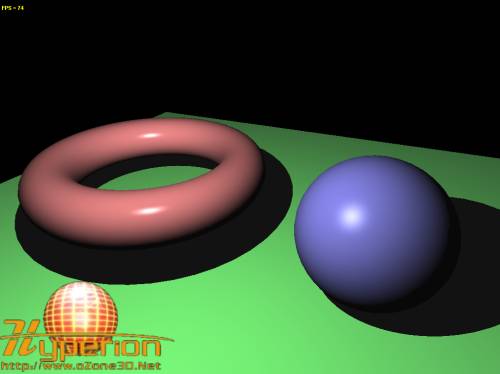
Fig.1 - The point_light.xml demo.Here is a table that shows us equivalences between theorical terms seen above and GLSL implementation:
| As | gl_FrontLightModelProduct.sceneColor |
| Al | gl_LightSource[0].ambient |
| Am | gl_FrontMaterial.ambient |
| Dl | gl_LightSource[0].diffuse |
| Dm | gl_FrontMaterial.diffuse |
| Sl | gl_LightSource[0].specular |
| Sm | gl_FrontMaterial.specular |
| f | gl_FrontMaterial.shininess |