
Category Archives: OpenGL
Les Cartes GeForce et le keyword GLSL Precise
Les Sampler States OpenGL 3.3: Configurer les Unités de Texture

OpenGL Versions, Features Overview

GLSL Random Generator

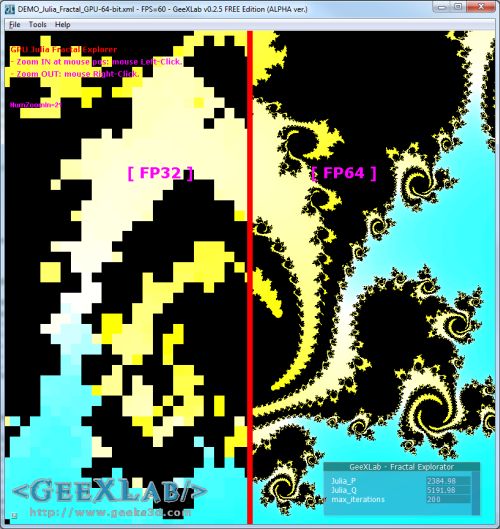
Test de la Double Precision FP64 en GLSL
(GLSL) Ecriture dans gl_FragDepth
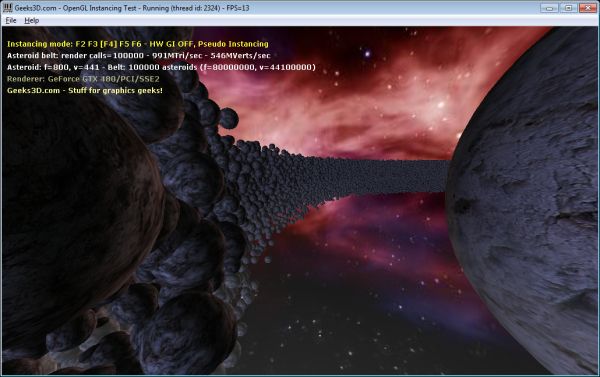
Geometry Instancing en OpenGL: le Presque Retour!
PyOpenGL pour Coder en OpenGL dans GeeXLab Sans Compilation

(GeeXLab) Bump Mapping et Self Shadow
HowTo: Matrice de Projection Perspective en OpenGL

How To Linearize the Depth Value
Here is a GLSL code snippet to convert the exponential depth to a linear value:
float f=1000.0;

float n = 0.1;

float z = (2 * n) / (f + n - texture2D( texture0, texCoord ).x * (f - n));
where:
– f = camera far plane
– n = camera near plane
– texture0 = depth map.
The Art of Texturing in GLSL is Now a Resource of OpenGL.org
The tutorial The Art of Texturing Using the OpenGL Shading Language has been included in OpenGL.org website in OpenGL API OpenGL Shading Language Sample Code & Tutorials section. Rather cool… 😉

Vertex Displacement Mapping in GLSL Now Available on Radeon!
As I said in this news, the release of Catalyst 8.10 BETA comes with a nice bugfix: vertex texture fetching is now operational on Radeon (at least on my Radeon HD 4850). From 2 or 3 months, Catalyst makes it possible to fetch texture from inside a vertex shader. You can see with GPU Caps Viewer how many texture units are exposed in a vertex shader for your Radeon:
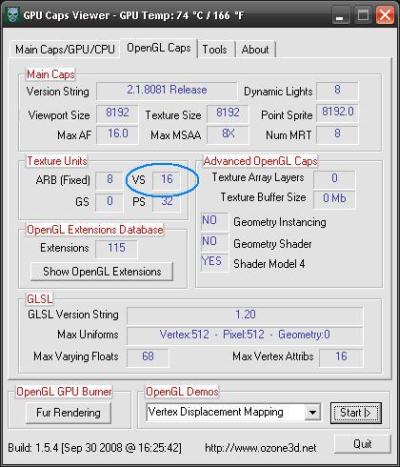
But so far, vertex texture fetching in GLSL didn’t work due to a bug in the driver. But now this is an old story, since VTF works well. For more details about vertex displacement mapping, you can read this rather old (2 years!) tutorial: Vertex Displacement Mapping using GLSL.
This very cool news makes me want to create a new benchmark based on VTF!
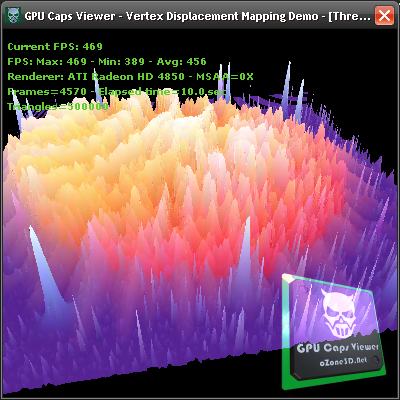
I’ve only tested the XP version of Catalyst 8.10. If someone has tested the Vista version, feel free to post a comment…
Next step for ATI driver team: enable geometry texture fetching: allows texture fetching inside a geometry shader…
See you soon!
Saturate function in GLSL
During the conversion of shaders written in Cg/HLSL, we often find the saturate() function. This function is not valid in GLSL even though on NVIDIA, the GLSL compiler accepts it (do not forget that NVIDIA’s GLSL compiler is based on Cg compiler). But ATI’s GLSL compiler will reject saturate() with a nice error. This function allows to limit the value of a variable to the range [0.0 – 1.0]. In GLSL, there is a simple manner to do the same thing: clamp().
Cg code:
float3 result = saturate(texCol0.rgb - Density*(texCol1.rgb));
GLSL equivalent:
vec3 result = clamp(texCol0.rgb - Density*(texCol1.rgb), 0.0, 1.0);
BTW, don’t forget all float4, float3 and float2 which correct syntax in GLSL is vec4, vec3 and vec2.
Lors de la conversion de shaders écrits en Cg/HLSL, on trouve souvent la fonction saturate(). Cette fonction n’est pas valide en GLSL bien que sur les NVIDIA le compilateur l’accepte (n’oublions pas que le compilateur GLSL de NVIDIA repose sur le compilateur Cg). Mais le compilateur GLSL d’ATI générera une belle erreur à la vue de saturate(). Cette fonction sert à limité la valeur d’une variable entre 0.0 et 1.0. En GLSL il y un moyen tout simple de faire la même chose: clamp().
Code Cg:
float3 result = saturate(texCol0.rgb - Density*(texCol1.rgb));
Equivalent GLSL:
vec3 result = clamp(texCol0.rgb - Density*(texCol1.rgb), 0.0, 1.0);
Au passage lors des conversions, n’oubliez pas les float4, float3 et float2 qui s’écrivent en GLSL en vec4, vec3 et vec2.
GLSL support in Intel graphics drivers
A user from oZone3D.Net forum asked me some info about the GLSL support of Intel graphics chips. It’s wellknown (sorry Intel) that Intel has a bad OpenGL support in its Windows drivers and even if Intel’s graphics drivers support OpenGL 1.5, there is still a lack of GLSL support. We can’t find the GL_ARB_shading_language_100 extension (this extension means the graphics driver supports the OpenGL shading language) and this extension should be supported by any OpenGL 1.5 compliant graphics driver. You can use GPU Caps Viewer to check for the avaibility of GL_ARB_shading_language_100 (in OpenGL Caps tab).
Here is an example of a Intel’s graphics driver that support openGL 1.5 without supporting GLSL:
– Mobile IntelR 965 Express Chipset Family
For more examples, look at users’s submissions here: www.ozone3d.net/gpu/db/
Okay this is my analysis, but what is the Intel point of view? Here is the answer:
– x3100 & OpenGL Shader (GLSL) thread
– Intel’s answer
I think GLSL support with Windows is not a priority for Intel…
GLSL float to RGBA8 encoder
Packing a [0-1] float value into a 4D vector where each component will be a 8-bits integer:
vec4 packFloatToVec4i(const float value)
{
  const vec4 bitSh = vec4(256.0*256.0*256.0, 256.0*256.0, 256.0, 1.0);
  const vec4 bitMsk = vec4(0.0, 1.0/256.0, 1.0/256.0, 1.0/256.0);
  vec4 res = fract(value * bitSh);
  res -= res.xxyz * bitMsk;
  return res;
}
Unpacking a [0-1] float value from a 4D vector where each component was a 8-bits integer:
float unpackFloatFromVec4i(const vec4 value)
{
  const vec4 bitSh = vec4(1.0/(256.0*256.0*256.0), 1.0/(256.0*256.0), 1.0/256.0, 1.0);
  return(dot(value, bitSh));
}
Source of these codes: Gamedev forums
NVIDIA Forceware 174.20: OpenGL Extensions
[French]
Voici la liste des extensions OpenGL supportées par les pilotes Forceware 174.20.
[/French] [English] Here is the list of OpenGL extensions supported by Forceware 174.20 drivers.
[/English]
[/French] [English] Here is the list of OpenGL extensions supported by Forceware 174.20 drivers.
[/English]
OpenGL Extensions: 161 extensions
ATI Catalyst 8.3: OpenGL Extensions
[French]
Voici la liste des extensions OpenGL supportées par les pilotes Catalyst 8.3. Il y en a 96.
[/French] [English] Here is the list of OpenGL extensions supported by Catalyst 8.3 drivers. There are 96 extensions.
[/English]
[/French] [English] Here is the list of OpenGL extensions supported by Catalyst 8.3 drivers. There are 96 extensions.
[/English]
- Drivers Version: 8.471.0.0 – Catalyst 08.3
- ATI Catalyst Version String: 08.3
- ATI Catalyst Release Version String: 8.471-080225a1-059746C-ATI
OpenGL Geometry Instancing
This article has been updated with new demos and new GI technique. Read the complete article here: OpenGL Geometry Instancing: GeForce GTX 480 vs Radeon HD 5870.
[French] Voici une petite démo qui utilise les techniques d’instancing (instancing simple, pseudo-instancing et geometry instancing(ou GI)) pour effectuer le rendu d’un anneau composé de 10000 petites sphères.
La démo est livrée en 5 versions:
- chaque sphère est composée de 1800 triangles (18 millions de triangles pour l’anneau entier)
- chaque sphère est composée de 800 triangles (8 millions de triangles pour l’anneau entier)
- chaque sphère est composée de 200 triangles (2 millions de triangles pour l’anneau entier)
- chaque sphère est composée de 72 triangles (720000 triangles pour l’anneau entier)
- chaque sphère est composée de 18 triangles (180000 triangles pour l’anneau entier)
J’ai ajouté au dernier moment un extra: une version avec 20000 instances de 5000 triangles chacune soit 100 millions de polygones (fichier Demo_Instancing_100MTriangles_20kInstances.exe).
[/French]
[English]
This demo uses instancing techniques (simple instancing, pseudo-instancing and geometry instancing(or GI)) to render a ring made of 10,000 small spheres. The demo is delivered in 5 versions:
- each sphere is made of 1,800 triangles (18 millions triangles for the whole ring)
- each sphere is made of 800 triangles (8 millions triangles for the whole ring)
- each sphere is made of 200 triangles (2 millions triangles for the whole ring)
- each sphere is made of 72 triangles (720,000 triangles for the whole ring)
- each sphere is made of 18 triangles (180,000 triangles for the whole ring)
I added in the last moment a bonus: a 20,000 instances version, each instance made of 5,000 triangles. We get the monstruous count of 100 millions triangles (file Demo_Instancing_100MTriangles_20kInstances.exe).
[/English]


DOWNLOAD
[French] Il y a plusieurs techniques d’instancing qui sont utilisées et chaque technique est accessible avec une des touches F1 à F6.- F1: instancing simple avec camera frustum culling: il y a une seule source de géométrie (un mesh) et elle est rendu pour chaque instance. Le calcul de la matrice de transformation est fait sur le CPU ainsi que le test de clipping avec la camera. Le rendu OpenGL utilise la fonction glDrawElements().
- F2: instancing simple SANS camera frustum culling: il y a une seule source de géométrie (un mesh) et elle est rendu pour chaque instance. Le calcul de la matrice de transformation est fait sur le CPU mais il n’y a plus de test de clipping avec la camera. Le rendu OpenGL utilise la fonction glDrawElements().
- F3: pseudo-instancing lent: il y a une seule source de géométrie (un mesh) et elle est rendu pour chaque instance. Le calcul de la matrice de transformation est maintenant effectué sur le GPU. Le passage des paramètres pour chaque instance se fait avec des variables uniformes. Il n’y a pas de test de clipping avec la camera. Le rendu OpenGL utilise la fonction glDrawElements().
- F4: pseudo-instancing rapide: il y a une seule source de géométrie (un mesh) et elle est rendu pour chaque instance. Le calcul de la matrice de transformation est maintenant effectué sur le GPU. Le passage des paramètres pour chaque instance se fait avec des attributs de vertex persistants (comme les coordonnées de textures ou la couleur). C’est cette technique qui
a été mise en avant par NVIDIA avec son whitepaper: GLSL Pseudo-Instancing. Il n’y a pas de test de clipping avec la camera. Le rendu OpenGL utilise la fonction glDrawElements(). - F5: Geometry Instancing: c’est le vrai instancing hardware. Il y a une seule source de géométrie (un mesh) et le rendu se fait par lots (ou batchs) de 400 instances par draw call. Le rendu complet de l’anneau ne nécessite que 25 draw-calls au lieu de 10000. Le calcul de la matrice de transformation est effectué sur le GPU. Le passage des paramètres pour chaque batch se fait avec des tableaux de variables uniformes. Il n’y a pas de test de clipping avec la camera. Le rendu OpenGL utilise la fonction glDrawElementsInstancedEXT(). Actuellement, seules les cartes NVIDIA GeForce 8 (et sup.) supportent cette fonction.
- F6: Geometry Instancing avec attributs de vertex persistants: c’est le geometry instancing hardware couplé avec le passage des paramètres par les attributs de vertex persistants. Mais le nombre d’attributs de vertex persistants est très limité. Au maximum j’ai reussi à rendre 4 instances par draw-call. Mais étrangement, 2 instances par draw-call donne de meilleurs résultats. Dans ce cas, le rendu complet de l’anneau nécessite que 5000 draw-calls au lieu des 10000. Le calcul de la matrice de transformation est effectué sur le GPU. Il n’y a pas de test de clipping avec la camera. Le rendu OpenGL utilise la fonction glDrawElementsInstancedEXT(). Actuellement, seules les cartes NVIDIA GeForce 8 (et sup.) supportent cette fonction.
- F1: simple instancing with camera frustum culling: there is one source for geometry (a mesh) and it’s rendered for each instance. The tranformation matrix calculation is done on the CPU as well as the camera frustum test. OpenGL rendering uses the glDrawElements() function.
- F2: simple instancing without camera frustum culling: there is one source for geometry (a mesh) and it’s rendered for each instance. The tranformation matrix calculation is done on the CPU but there is no longer camera frustum test. OpenGL rendering uses the glDrawElements() function.
- F3: slow pseudo-instancing: there is one source for geometry (a mesh) and it’s rendered for each instance. Now the tranformation matrix calculation is done on the GPU and per-instance data are passed via uniform variables. There is no camera frustum test. OpenGL rendering uses the glDrawElements() function.
- F4: pseudo-instancing: there is one source for geometry (a mesh) and it’s rendered for each instance. The tranformation matrix calculation is done on the GPU and per-instance data are passed via persistent vertex attributes (like texture coordinates or color). This technique has been shown by NVIDIA in the following whitepaper: GLSL Pseudo-Instancing. There is no camera frustum test. OpenGL rendering uses the glDrawElements() function.
- F5: geometry instancing: it’s the real hardware instancing. There is one source for geometry (a mesh) and rendering is done by batchs of 400 instances per draw-call. The whole rendering of the ring requires 25 draw-calls instead of 10,000. The tranformation matrix calculation is done on the GPU and per-batch data is passed via uniform arrays. There is no camera frustum test. OpenGL rendering uses the glDrawElementsInstancedEXT() function. Currently, only NVIDIA GeForce 8 (and higher) support this function.
- F6: geometry instancing with persistant vertex attributes: it’s the hardware instancing coupled with the transmission of parameters is done via the persistent vertex attributes. But the number of persistent vertex attributes is very limited. The best I did is to render 4 instances per draw-call. But oddly, I got the best results with 2 instances per draw-call. In that case, the rendering of whole ring requires 5000 draw-calls. The tranformation matrix calculation is done on the GPU and per-batch data is passed via uniform arrays. There is no camera frustum test. OpenGL rendering uses the glDrawElementsInstancedEXT() function. Currently, only NVIDIA GeForce 8 (and higher) support this function.
Ok now, let’s see some results with a NVIDIA GeForce 8800 GTX and an ATI Radeon HD 3870. Both cards have been tested with an AMD 64 3800+.
[/English]
18 millions triangles – 1800 tri/instance
NVIDIA GeForce 8800 GTX – Forceware 169.38 XP32
- F1: 223MTris/sec – 13FPS
- F2: 223MTris/sec – 13FPS
- F3: 223MTris/sec – 13FPS
- F4: 223MTris/sec – 13FPS
- F5: 223MTris/sec – 13FPS
- F6: 171MTris/sec – 10FPS
ATI Radeon HD 3870 – Catalyst 8.2 XP32
- F1: 429MTris/sec – 25FPS
- F2: 463MTris/sec – 27FPS
- F3: 446MTris/sec – 26FPS
- F4: 274MTris/sec – 16FPS
- F5: mode not available
- F6: mode not available
8 millions de triangles – 800 tri/instance
NVIDIA GeForce 8800 GTX – Forceware 169.38 XP32
- F1: 190MTri/sec – 25FPS
- F2: 190MTri/sec – 25FPS
- F3: 205MTri/sec – 27FPS
- F4: 213MTri/sec – 28FPS
- F5: 205MTri/sec – 27FPS
- F6: 152MTri/sec – 20FPS
ATI Radeon HD 3870 – Catalyst 8.2 XP32
- F1: 251MTris/sec – 33FPS
- F2: 236MTris/sec – 31FPS
- F3: 297MTris/sec – 39FPS
- F4: 251MTris/sec – 33FPS
- F5: mode not available
- F6: mode not available
2 millions de triangles – 200 tri/instance
NVIDIA GeForce 8800 GTX – Forceware 169.38 XP32
- F1: 47MTri/sec – 25FPS
- F2: 47MTri/sec – 25FPS
- F3: 57MTri/sec – 30FPS
- F4: 131MTri/sec – 69FPS
- F5: 167MTri/sec – 88FPS
- F6: 148MTri/sec – 78FPS
ATI Radeon HD 3870 – Catalyst 8.2 XP32
- F1: 47MTris/sec – 25FPS
- F2: 59MTris/sec – 31FPS
- F3: 74MTris/sec – 39FPS
- F4: 112MTris/sec – 59FPS
- F5: mode not available
- F6: mode not available
720,000 triangles – 72 tri/instance
NVIDIA GeForce 8800 GTX – Forceware 169.38 XP32
- F1: 17MTri/sec – 25FPS
- F2: 17MTri/sec – 25FPS
- F3: 20MTri/sec – 30FPS
- F4: 47MTri/sec – 69FPS
- F5: 60MTri/sec – 88FPS
- F6: 53MTri/sec – 78FPS
ATI Radeon HD 3870 – Catalyst 8.2 XP32
- F1: 17MTris/sec – 25FPS
- F2: 21MTris/sec – 31FPS
- F3: 26MTris/sec – 39FPS
- F4: 40MTris/sec – 59FPS
- F5: mode not available
- F6: mode not available
180000 triangles – 18 tri/instance
NVIDIA GeForce 8800 GTX – Forceware 169.38 XP32
- F1: 4MTri/sec – 25FPS
- F2: 4MTri/sec – 25FPS
- F3: 5MTri/sec – 30FPS
- F4: 11MTri/sec – 69FPS
- F5: 15MTri/sec – 89FPS
- F6: 13MTri/sec – 79FPS
ATI Radeon HD 3870 – Catalyst 8.2 XP32
- F1: 4MTris/sec – 25FPS
- F2: 5MTris/sec – 31FPS
- F3: 6MTris/sec – 39FPS
- F4: 10MTris/sec – 59FPS
- F5: mode not available
- F6: mode not available
- nous comprenons maintenant pourquoi NVIDIA a appellé “Pseudo-Instancing” la technique utilisant les attributs persistants de vertex (key F4). La fonction glDrawElements() d’OpenGL est extremement rapide et optimisée et les attrubuts persistants de vertex nécessitent moins de traitement que les variables uniformes pour être passés au vertex shader. Les deux couplés ensemble donnent ce boost de performance.
- le bénéfice du vrai hardware geometry instancing est principalement visible losqu’il y a peu de triangles par instance.
- lorsqu’il y a beacoup de triangles par instance (1800), l’impémentation matérielle de glDrawElements() semble être plus efficace (près de deux fois!) sur le GPU RV670 que sur le G80.
Conclusion
Au vu des résultats, le hardware geometry instancing n’est pas la kill-feature que j’attendais. Je trouve cela très curieux car la différence entre 10000 render-calls avec glDrawElements et 25 render-calls avec glDrawElementsInstancedEXT n’est pas très importante. On dirait que la gestion de l’instancing (variable gl_InstanceID dans le vertex shader) fait perdre beaucoup de temps. Je trouve aussi dommage qu’ATI n’ait pas encore pris le temps d’implémenter le geomtry instancing dans les pilotes Catalyst. Je serais très curieux de tester le GI hardware avec un RV670.
[/French]
[English]
Quick results analysis:
- we now understand why NVIDIA has called the technique using persistent vertex attributes “Pseudo-Instancing” (key F4). OpenGL glDrawElements() function is extremly fastand persistent vertex attributes require less overhead than uniforms to be passed to vertex shader. Both coupled together give this performance boost.
- benefit of real hardware geometry instancing is mostly visible with few triangles per instance.
- when there are many triangles per instance (1,800), the hardware implementation of glDrawElements() seems to be more efficient (twice!) on RV670 GPU than on G80.
Conclusion
From the results, hardware geometry instancing isn’t the kill-feature I expected. I find that very weird since the différence between 10000 render-calls with glDrawElements and 25 render-calls with glDrawElementsInstancedEXT is not verx important. Seems the instancing management (gl_InstanceID variable in the vertex shader) is a GPU-cycle eater!What a pity ATI hasn’t implemented yet geometry instancing in the Catalyst drivers. I’d be very curious to test hardware GI with a RV670.
[/English]